
Google Flights vs Airline Direct Booking: Where Should You Buy? (2026)
✈️ Flight Hack Spec Card
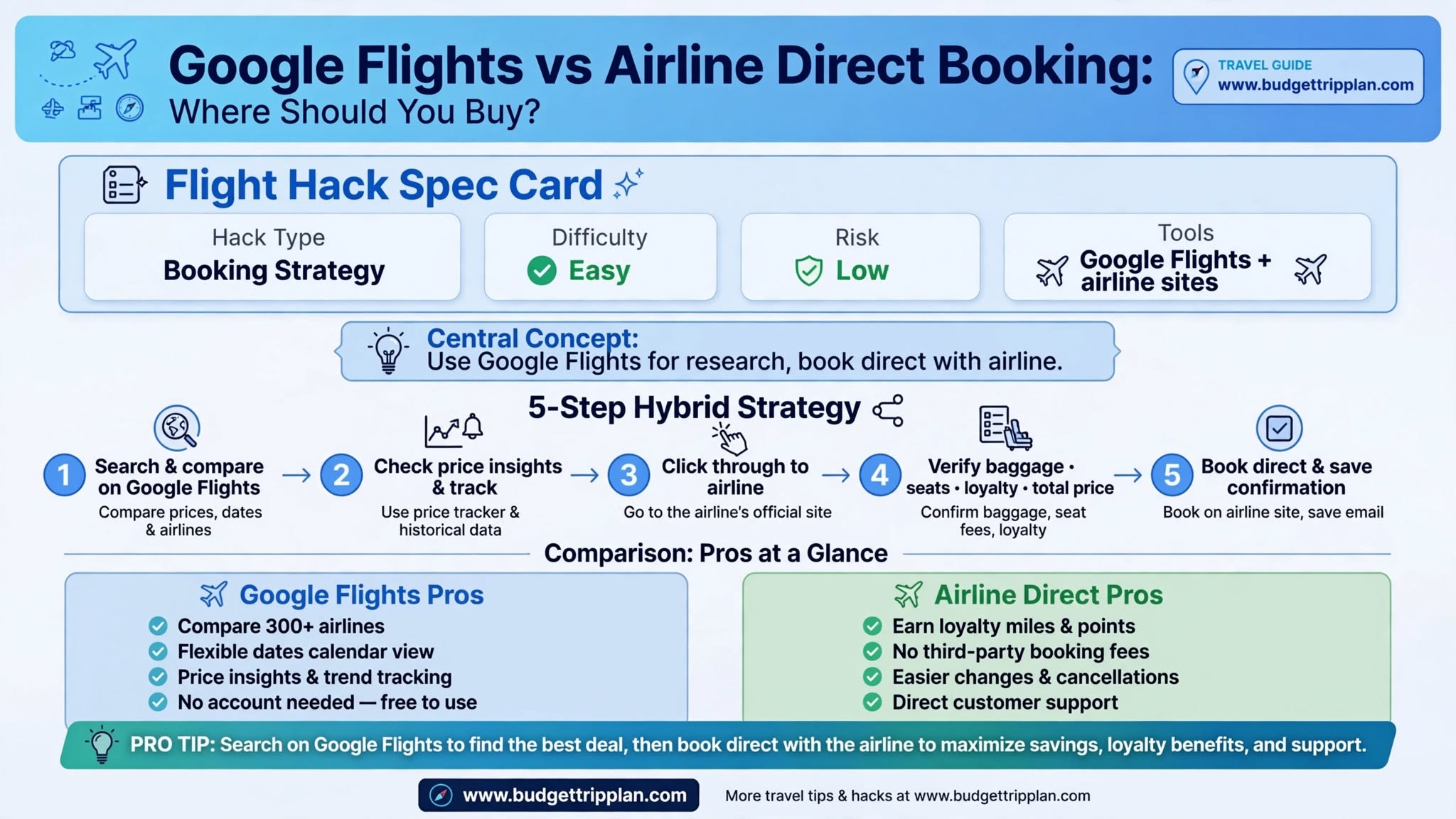
Quick Steps & Summary
Full Flight Hack Guide
Quick Answer (TL;DR)
Use Google Flights for research and comparison, and buy from the airline in most cases. Google Flights is a strong tool for comparing routes, schedules, and prices and for spotting good fares. Booking directly with the airline usually makes it easier to get help during delays, change your ticket, add seats or bags, and earn frequent flyer miles. If an online travel agency is clearly cheaper, compare the total price and the change terms before you decide.
---
What Is the Difference Between Google Flights and Booking Direct?
Google Flights is a search tool, not a travel agency. It lets you book from more than 300 airline and online travel agency partners, and those partnerships do not affect how offers are ranked.
When you choose a flight, Google Flights usually sends you to the airline's website or to an online travel agency to complete the purchase.
Key differences include:
---
Why You Should Search with Google Flights First
Fast Comparison Across Airlines
Google Flights lets you compare travel time, layovers, and prices side by side. You can filter by cabin class, airlines, and number of stops.
Price Insights and Flexible Dates
The calendar and price graph show which dates are cheaper, and Google Flights can show whether prices are low, typical, or high for a route. Use them to avoid buying during a price spike.
Alternative Airports and Map Search
You can compare nearby airports and browse by map to see cheaper options you might not have considered.
---
Why You Should Buy Directly from the Airline
Easier Support When Something Goes Wrong
If your flight is delayed, cancelled, or changed, the airline can help you directly when you booked with it. If you booked through an agency, you often have to deal with the agency first, which adds a step.
Simpler Changes
Direct bookings let you manage your ticket in the airline's app or account. How flexible your ticket is depends on the fare type, so read the fare rules before you buy.
Easier Seats, Bags, and Miles
Adding seats, bags, or special assistance is usually simpler when the booking sits in your own airline account. Enter your frequent flyer number at checkout to earn miles according to the airline's rules.
The U.S. 24-Hour Rule
For flights to, from, or within the United States that you book at least seven days before departure, airlines must either let you hold the fare for 24 hours or let you cancel within 24 hours for a full refund. This rule applies when you book directly with the airline, not through an agency. Many airlines choose the cancellation option, but policies differ, so check the airline's terms before you buy. Other countries have different rules, so do not assume the same protection elsewhere.
---
The Ultimate Hybrid Booking Strategy
1. Search on Google Flights: Use filters, the calendar, and price insights to find the best itinerary.
2. Click through to the airline: Choose the booking option listed under the airline's own name.
3. Verify the details: Check the total price, baggage allowance, seat options, and frequent flyer field on the airline's checkout page.
4. Book direct and save your confirmation: Keep the booking reference and add it to the airline's app.
---
Smart Booking Tactics and Pro Tips
1. Confirm the price at checkout: Google says the prices in its calendar update about once every 24 hours, so the final price can differ slightly.
2. Check the fare type: A cheaper fare may limit changes, bags, or seat selection. Compare what is included, not only the price.
3. Add bags to the comparison: Google Flights lets you filter by bag fees, which helps when you compare low-cost options.
4. Use price tracking before you buy: Our Google Flights Price Alerts Guide explains how to track a route.
5. Check the airline's site if a flight is missing: Google Flights does not include every airline, so confirm the schedule on the airline's own site.
---
Troubleshooting: What If an Agency Is Cheaper?
---
Frequently Asked Questions
Is Google Flights cheaper than booking direct?
Usually the price is the same when you click through to the airline. Agencies sometimes show a lower price, but compare the total cost and the change and refund terms before you choose.
Does Google Flights charge booking fees?
No. Google Flights does not charge you to search or to click through. You pay the airline or agency at checkout, and that seller may add its own fees.
Can I earn frequent flyer miles when I book through a Google Flights link?
Yes, if you book on the airline's own site and add your frequent flyer number. Booking through an agency may not earn miles, so check the terms first.
Does Google Flights show every airline?
No. Airlines and agencies need a partnership with Google to appear, so some carriers and flights may be missing. Check the airline's site if a route looks incomplete.
---
Final Verdict
Use Google Flights as your research tool and, in most cases, buy from the airline. This gives you the price visibility of a search engine and the simpler support, changes, and loyalty benefits of a direct booking. If an agency is clearly cheaper, make that choice with the total price and the terms in front of you.
Next step: Open Google Flights, find your flight, click through to the airline, and book directly. Subscribe to our newsletter for more flight hacks.
Related Reading: Google Flights Price Alerts Guide | Google Flights Explore Guide | Skyscanner Price Alerts Guide | Flexible Routing Guide | Skyscanner Everywhere Guide
---