
Google Flights Explore: How to Map Cheap Flights Worldwide (2026)
✈️ Flight Hack Spec Card
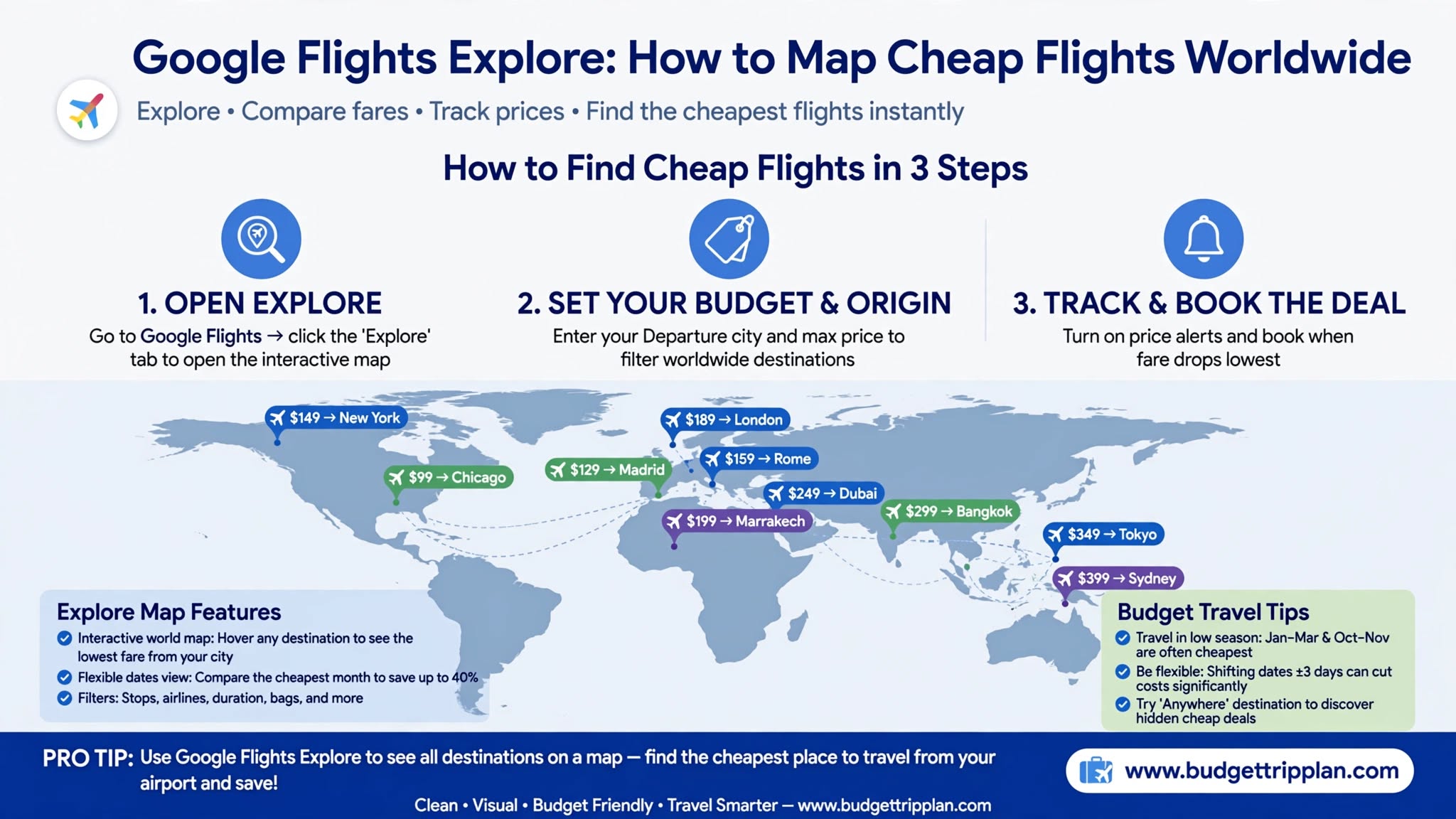
Quick Steps & Summary
Full Flight Hack Guide
Quick Answer (TL;DR)
Google Flights Explore is the map view of Google Flights. Instead of searching one destination at a time, you enter your home airport, leave the destination open, and choose a flexible date window such as a 1-week trip over the next six months. The map then shows current fares for destinations around the world, which makes it one of the fastest ways to find a cheap trip. Prices change often, so treat the map as a shortlist and confirm the final fare in the live results.
---
Why Use the Google Flights Explore Map?
Most travelers pick a destination first and then accept whatever price airlines charge for that route.
Explore reverses this approach:
---
How to Master Google Flights Explore Step by Step
Step 1: Open Explore and Set Your Departure Airports
1. Go to Google Flights and click Explore in the left menu.
2. Enter your main departure airport.
3. Add nearby airports if you can travel from them, for example JFK, EWR, and LGA if you live in New York. Searching several origins can uncover cheaper fares.
Step 2: Set the Destination to "Anywhere"
Leave the destination field empty or type Anywhere. You can also enter a continent or region, such as Europe or Southeast Asia, to narrow the map.
Step 3: Choose Flexible Dates
1. Click the date selector at the top.
2. Switch from Specific dates to Flexible dates.
3. Pick a trip length, such as a weekend, 1 week, or 2 weeks, and a travel period, such as the next 6 months or a specific month.
Step 4: Apply Filters
Use the filters to narrow the results. Stops, airlines, and trip duration are the most useful. Where a bags filter is available, set it to your luggage needs. Low fares can look cheaper than they are once baggage fees are added.
Step 5: Zoom In and Open the Live Results
At a global zoom level, the map highlights major destinations. Zoom into a region, such as Central Europe or Southeast Asia, to reveal nearby airports that may be cheaper. Then click a destination and open View flights to see actual itineraries, dates, and fares.
---
Smart Booking Tactics and Pro Tips
1. Use a desktop for deeper scanning: A larger screen makes it easier to compare the map, list, and filters side by side. Mobile works well for quick checks.
2. Test nearby dates: Move your trip by a day or two and compare weekdays. Fares often vary by departure day, so check the dates instead of assuming a rule.
3. Combine Explore with price tracking: After you find a good destination, open View flights and turn on Track prices. If your dates are flexible, you can track "Any dates." Read our Google Flights Price Alerts Guide for the full setup.
4. Remember that prices belong to dates: The price on a map card applies to the dates shown on that card. Change the dates, and the fare can change.
5. Add ground transport and bags: A cheap secondary airport can cost more once you add bag fees and the trip into the city.
---
Troubleshooting: Why Is My Map Empty or Limited?
---
Frequently Asked Questions
Is Google Flights Explore free?
Yes. Searching and price tracking in Google Flights are free. You book with the airline or a booking partner.
Does Google Flights Explore include low-cost airlines?
Many low-cost carriers appear, but not every airline or flash sale is listed. Always check the airline's own website too. For more tools that cover budget carriers, see our Flexible Routing Guide
Can I search one-way flights on the Explore map?
Yes. Change the trip type from Round trip to One-way before you search to map one-way fares.
Why do prices change when I open a destination?
The map gives a quick overview, while the live results show current availability. Fares can change between the two, so rely on the live results when you decide.
---
Final Verdict
If your dates or destinations are flexible, the Google Flights Explore map is one of the fastest ways to find a cheap trip. It replaces hours of manual searching with a clear visual shortlist. Use it for ideas, then verify the details before you book.
Next step: Open Google Flights Explore, set your home airport, choose flexible dates, and see where you can fly for less. Subscribe to our newsletter for more flight hacks.
Related Reading: Google Flights Price Alerts Guide | Skyscanner Everywhere Guide | Flexible Routing Guide
---